Raliera


Run league night from the desk
Check players in, start the rounds and take every court’s score from one screen, with the night’s standings updating as scores are saved.
Who can do this: The Club Director, and staff the Director has given this job in Team Access.
Check players in
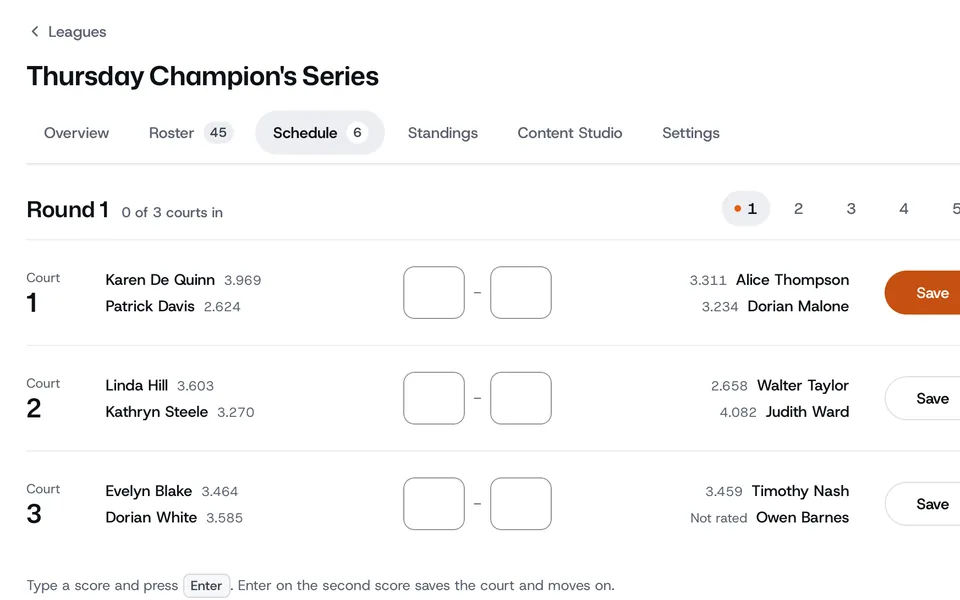
- Open the league. Its tabs are Overview, Roster, Schedule, Standings, Content Studio and Settings.
- On the Overview, press Open Check-In. Team leagues show Run the Session instead.
- Check players in as they arrive. Everyone’s here checks in the whole list, Sub or swap puts a sub in, and Add a walk-in adds someone new.
Start the rounds
- Press Generate Rounds when everyone is in.
- The Schedule tab now shows the desk: the round, every court, and how many courts are in.
Take the scores
- Type each court’s score and press Save. The court shows Final.
- To fix a score, press Edit score on that court and save again.
- The Tonight panel shows the night’s standings as scores come in.
Some formats, such as best-of matches and playoff weeks, show every court on one screen instead. The scores work the same way.