Raliera


Book a court from the desk
Book a court for players from the calendar. Raliera shows each player’s price from their plan and will not let you book a court that is already taken.
Who can do this: The Club Director, and staff the Director has given this job in Team Access.
Book on the calendar
- Choose Calendar in the sidebar and switch to the Day view.
- Click an empty time on a court. Drag along the court to make the booking longer.
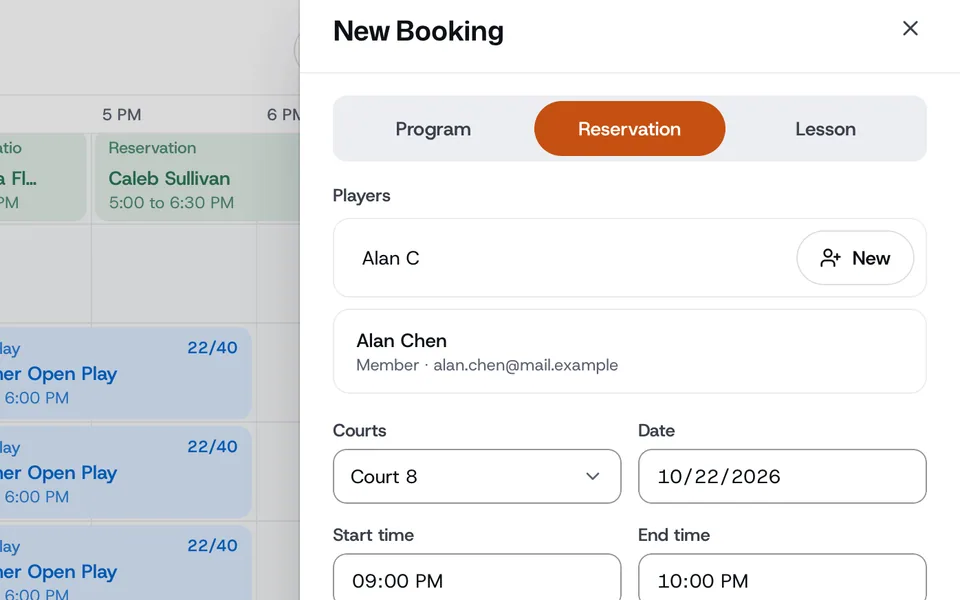
- In the booking window, choose Reservation.
- Under Players, search by name or email, or choose New to add a player. Each player shows their price from your court pricing, with the Subtotal, Tax and Total underneath.
- Check the Court, Date, Start time and End time. A court that is already booked at that time is marked Booked and cannot be picked.
- Press Add Reservation.
Take payment
- Click the booking on the calendar to open it.
- Press Collect next to the amount owed. The Complete Payment window opens.
- Pick how they pay, for example Card on file, Cash or Club credit, then press the button that shows the amount.
If Raliera says it couldn’t add the booking, someone else took the court first. Pick another court or time.